

AI Photo Restoration
Scratched print? Water-damaged portrait? This old photo restoration tool fixes the damage and brings faded images back to life. Upload a scan, and the AI handles scratch removal, color recovery, and detail sharpening. No Photoshop needed.


Loved by 10,000+ creators
Click to upload or drag and drop
JPG, PNG, WebP (max 10MB)
Processing typically takes 30-60 seconds.
Before & After
How Old Photo Restoration Works
Scan your damaged print. Upload it. The old photo restoration AI does the rest.
1. Upload Your Photo
Scan the damaged print or snap a picture with your phone. JPG, PNG, or WebP up to 10MB. Drag and drop to start.
2. AI Analyzes Damage
The AI detects scratches, fading, tears, and color loss. It maps every damaged area automatically.
3. Review the Restored Photo
Download your restored image. Old photo restoration keeps the original character while removing all visible damage. Compare before and after.
4. Download and Share
Save the result in full resolution. Print it, frame it, or share it with family. Results are yours to keep.
Explore More AI Tools
Explore our comprehensive suite of AI-powered creative tools designed to enhance your workflow.
Veo 3.1 Video
Google Veo 3.1 with native audio and realistic physics for cinematic video generation.
Seedance 1.5 Pro
ByteDance Seedance 1.5 Pro with joint audio-video generation for professional results.

Nano Banana Pro Image Generator
Advanced text-based image editing with enhanced AI capabilities and professional-grade results.

Seedream 4.5 Image Generator
Ultra-fast professional image generation in under 1 second with 4K resolution support.

Qwen Image 2512
20B MMDiT model with best-in-class bilingual text rendering for stunning AI images.

GPT Image 2
OpenAI's newest image model. 13 aspect ratios, up to 4 reference photos, batches of 1-4.

Z-Image Generator
Ultra-fast image generation with Z-Image AI in under 1 second.

AI Music Generator
Generate music with AI, customize styles, and produce royalty-free tracks instantly.
Your Family Photos Deserve Better Than a Shoebox
That wedding portrait from 1972 has a crease down the middle. Your grandfather's military photo is yellowed and spotted. You tried fixing them in Photoshop — three hours later, the skin looks plastic. Old photo restoration shouldn't take a weekend. This tool does the repair work in seconds.
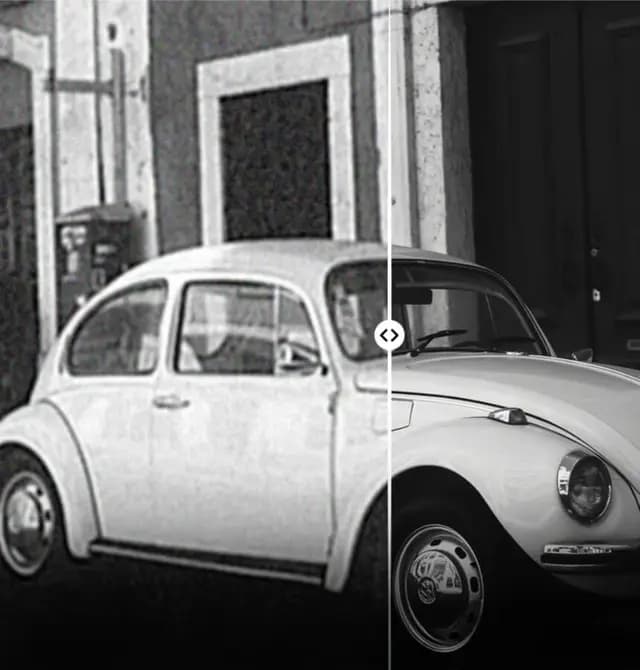
Scans, Prints, Film — All of It
Faded Polaroids, cracked darkroom prints, 35mm negatives. This tool handles any format. The AI rebuilds what decades of damage took away.
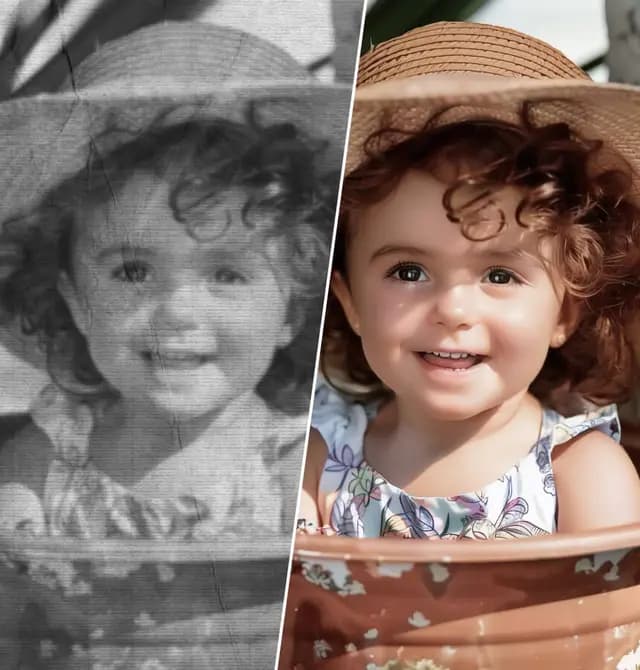
No Photoshop. No Clone Stamp. No Fuss.
Manual old photo restoration means hours with healing brushes and layers. This AI skips all of that. Upload, wait, download the repaired image.
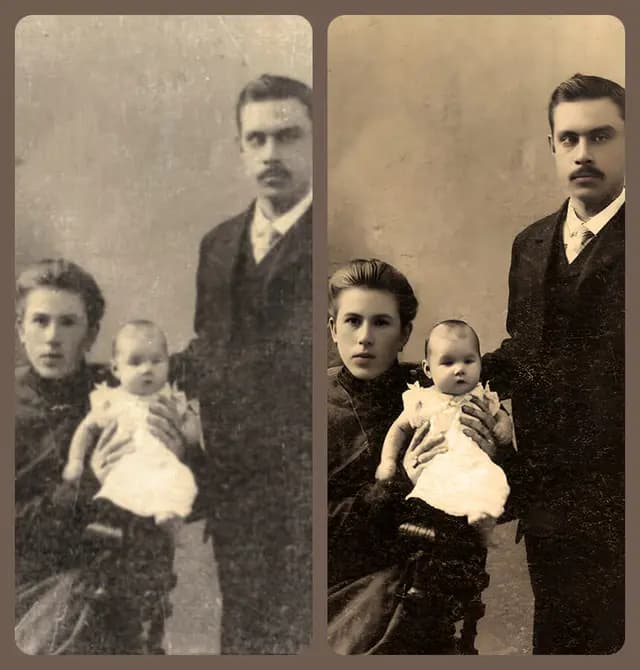
Scratch and Damage Removal
Creases, tears, water stains, mold spots — the AI identifies damage patterns and fills them with matching detail. Old photo restoration that actually looks natural.
Old Photo Restoration Features
Real repair, not just a filter. Old photo restoration that fixes structural damage Instagram presets can't touch.
Scratch and Tear Repair
Deep creases, surface scratches, torn edges. The AI rebuilds missing areas with context-aware fill. Old photo restoration that handles heavy damage.
Color Recovery
Faded prints get their original colors back. Old photo restoration corrects yellowing, fixes color casts, and restores natural skin tones.
Face Detail Recovery
Blurry faces get special treatment. Old photo restoration AI sharpens eyes, skin texture, and facial features while keeping natural expression intact.
Stain and Mold Removal
Water damage, foxing spots, mold stains — old photo restoration removes them without affecting surrounding detail. Clean results every time.
Works on Any Device
Mac, Windows, phone, tablet. Run old photo restoration from any browser. All processing happens in the cloud.
Pay Per Restoration
Free credits on signup for old photo restoration. No subscription needed. No monthly fees. Just pay for what you restore.
What Users Say About Old Photo Restoration
Families, historians, and photographers rely on old photo restoration to save irreplaceable images.
Rachel Torres
Family Historian
“Found my grandmother's wedding photo in a flooded basement. Half the image was water-stained. Old photo restoration removed every mark. The result looks like the original print.”
Daniel Kim
Professional Photo Retoucher
“I charge clients $80 per manual restoration. Now I use old photo restoration AI for the heavy lifting and finish in Photoshop. Cuts my turnaround time by 70%.”
Maria Gonzalez
Genealogy Enthusiast
“Scanned 200 family photos from the 1960s. Most had scratches and fading. Ran them through old photo restoration in a single afternoon. Never been this fast.”
James Mitchell
Hobbyist Photographer
“The face detail on restored portraits blew me away. My grandfather's eyes look sharp and alive again. This old photo restoration result brought my whole family to tears.”
Linda Cheng
Museum Archivist
“We archive historical photos for a county museum. Old photo restoration saved us months of manual work. The quality matches what our trained staff produces.”
Photo Restoration FAQ
Quick answers about old photo restoration features and how old photo restoration works.
Is old photo restoration free?
Yes. New accounts get free credits. No credit card required. Try your first old photo restoration at zero cost.
What types of damage can old photo restoration fix?
Scratches, tears, creases, water stains, mold spots, fading, yellowing, and color casts. Old photo restoration handles most physical and chemical damage found in prints.
Does old photo restoration work on black-and-white photos?
Yes. Repairs black-and-white prints and can also colorize them. Old photo restoration works on images from any era or decade.
How long does old photo restoration take?
Under a minute for most images. Heavily damaged prints may take slightly longer. Old photo restoration runs in the cloud.
Does old photo restoration change faces?
No. Old photo restoration preserves original facial features. It sharpens details without altering bone structure, eye color, or expression.
What file formats does old photo restoration accept?
JPG, PNG, and WebP up to 10MB. Scan your prints at 300 DPI or higher for the best results.
Can I use restored photos commercially?
Yes. Everything produced is yours. Use old photo restoration results for print, publishing, exhibits, or any commercial purpose.
How does old photo restoration compare to manual Photoshop work?
Manual work takes hours with clone stamp and healing brush tools. Old photo restoration AI does comparable repair in under a minute.