

Vampire Fangs (cinematic + anime) XL + SD 1.5 + F1D + Illu + Pony - Fangs F1D v2.0 | Flux LoRA | Civitai
vampire fangsAbout this LoRA
The Vampire Fangs LoRA model offers a unique blend of cinematic and anime styles, optimized for creating realistic vampire-themed imagery. It supports multiple versions, including SD 1.5, Illu, and Pony, providing versatility in artistic expression.
Understanding Vampire Fangs (cinematic + anime) XL + SD 1.5 + F1D + Illu + Pony
The Vampire Fangs LoRA model is a versatile tool designed to create stunning vampire-themed imagery with a blend of cinematic and anime styles. It offers multiple versions, including SD 1.5, Illu, and Pony, allowing artists to explore different artistic expressions.
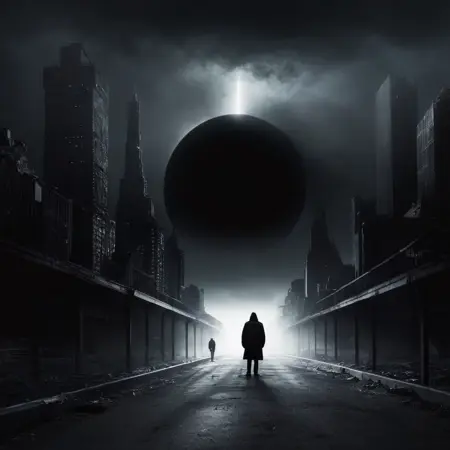
Distinctive Features and Capabilities
This model excels in creating realistic vampire fangs and atmospheric scenes. It is trained on the sdxl 1.0 base model combined with FLUX.1-dev, which enhances its ability to produce high-quality, detailed images. The model's strength lies in its ability to seamlessly integrate cinematic and anime styles, making it ideal for horror-themed projects.
Visual Gallery
This image demonstrates the model's capability to create a dark, atmospheric vampire scene with detailed fangs.
Real-World Applications
Cinematic Horror Scenes
The model is perfect for creating cinematic horror scenes, capturing the essence of vampire lore with its detailed fangs and atmospheric backgrounds.
Anime-Style Illustrations
Artists can use the model to produce anime-style illustrations with a unique vampire twist, offering a fresh take on traditional anime art.
Technical Deep Dive
Training Methodology
The model is trained on the sdxl 1.0 base model with FLUX.1-dev, focusing on enhancing the realism and detail of vampire-themed imagery.
Model Architecture
The model file size is 292.25 MB, and it uses SafeTensor for secure and efficient processing.
Performance Characteristics
The model is verified and has received very positive reviews, indicating its reliability and effectiveness in producing high-quality images.
Mastering Vampire Fangs: Professional Techniques
Prompt Engineering for Cinematic and Anime Styles
- Use "vampire fangs" as a trigger word to activate the model's unique style.
- Combine with realistic stock photo models for enhanced realism.
Optimal Settings and Parameters
- Experiment with different versions to find the best fit for your artistic needs.
Comprehensive Prompt Gallery
Cinematic Vampire Scene
Create a cinematic vampire scene with detailed fangs and a dark, atmospheric background.
Expected result: A realistic vampire scene with a cinematic touch.
Expert Q&A: Vampire Fangs Specifics
What makes Vampire Fangs different from similar models?
The model's unique blend of cinematic and anime styles sets it apart, offering versatility in artistic expression.
What were the key innovations in training this model?
The integration of the sdxl 1.0 base model with FLUX.1-dev enhances the model's ability to produce high-quality, detailed images.
Which artistic styles does it excel at?
The model excels at creating cinematic and anime-style vampire-themed imagery.
What are the optimal use cases for this model?
The model is ideal for creating cinematic horror scenes and anime-style illustrations with a vampire theme.
How does it handle complex scenes?
The model effectively captures the essence of vampire lore, producing detailed and atmospheric scenes.
What prompting techniques work best?
Using "vampire fangs" as a trigger word and combining with realistic stock photo models enhances the model's output.
Are there any known limitations?
The model is optimized for vampire-themed imagery, which may limit its versatility in other genres.
How does it compare to the base model?
The integration with FLUX.1-dev enhances the model's realism and detail, making it superior to the base model for vampire-themed projects.
What resolution works best?
The model performs well at high resolutions, capturing intricate details in vampire-themed scenes.
Can it be combined with other LoRAs?
Yes, the model can be combined with other LoRAs for enhanced artistic expression.
Style Analysis Through Examples
Style Characteristics
This image showcases the model's ability to create a dark, atmospheric vampire scene with detailed fangs.
- The model captures the essence of vampire lore with its detailed fangs and atmospheric backgrounds.
- It seamlessly integrates cinematic and anime styles, offering versatility in artistic expression.
Quality Assessment
The image demonstrates the model's high-quality output, capturing intricate details in vampire-themed scenes.
Range and Versatility
This image highlights the model's versatility in creating both cinematic and anime-style vampire scenes.
Professional Workflow Integration
For Cinematic Horror Productions
Professionals in the film industry can use the model to create realistic vampire scenes, enhancing the visual storytelling of horror films.
For Anime Illustrators
Anime illustrators can leverage the model's unique style to produce fresh, vampire-themed artwork, expanding their creative repertoire.
Final Verdict: When to Choose Vampire Fangs
The Vampire Fangs LoRA model is perfect for artists and filmmakers looking to create realistic vampire-themed imagery with a blend of cinematic and anime styles. Its versatility and high-quality output make it a valuable tool for horror-themed projects.
Perfect For:
- Cinematic horror scenes
- Anime-style vampire illustrations
Less Suitable For:
- Non-vampire-themed projects
Quick Reference Guide
- Trigger Word: "vampire fangs"
- Optimal Use Cases: Cinematic horror scenes, anime-style illustrations
- Recommended Settings: Combine with realistic stock photo models for enhanced realism
Related LoRAs

Fluxlisimo AURA (Analog stylisation / Improvements / Refinement / Detailed) - FLUX - v3.0
fluxlisimo_aura
![Baldurs Gate 3 Style [FLUX] - Flux v0.1](https://image.civitai.com/xG1nkqKTMzGDvpLrqFT7WA/83ffc269-fd40-450a-b12a-e8569559d8fb/original=true,quality=90/2025-01-29T19.03.57_1.jpeg)
Baldurs Gate 3 Style [FLUX] - Flux v0.1
aidmabaldursgate3
Middle Finger FLUX DEV LORA - v4
Middle Finger

Disney Animated Style Lora (Flux.1-Dev) - DisneyStyleV1
This is a digital illustration from a Disney animated film.