

ElevenLabs V3 Dialogue Generator
Generate complete multi-speaker conversations in one click. ElevenLabs V3 creates natural dialogue with perfect timing. No recording. No editing. No stitching audio files. Your podcast intro, audiobook chapter, or game dialogue is ready in seconds.


Loved by 10,000+ creators
Auto-detect works for most cases. Select a specific language for better accuracy.
Higher values produce more consistent speech, lower values add more variation
Create natural conversations with multiple AI voices. Add speakers, assign voices, and generate professional audio in seconds.
Explore More AI Tools
Explore our comprehensive suite of AI-powered creative tools designed to enhance your workflow.
Veo 3.1 Video
Google Veo 3.1 with native audio and realistic physics for cinematic video generation.
Seedance 1.5 Pro
ByteDance Seedance 1.5 Pro with joint audio-video generation for professional results.
Nano Banana Pro Image Generator
Advanced text-based image editing with enhanced AI capabilities and professional-grade results.

Seedream 4.5 Image Generator
Ultra-fast professional image generation in under 1 second with 4K resolution support.

Qwen Image 2512
20B MMDiT model with best-in-class bilingual text rendering for stunning AI images.
GPT Image 2
OpenAI's newest image model. 13 aspect ratios, up to 4 reference photos, batches of 1-4.

Z-Image Generator
Ultra-fast image generation with Z-Image AI in under 1 second.

AI Music Generator
Generate music with AI, customize styles, and produce royalty-free tracks instantly.
Tired of Stitching Audio Files Together?
You write a two-person podcast script. Now you need to generate each speaker separately, export, import into an editor, align timing, adjust pauses, hope it sounds natural. It never does. ElevenLabs V3 fixes this. One script. Multiple speakers. One generation. Done.
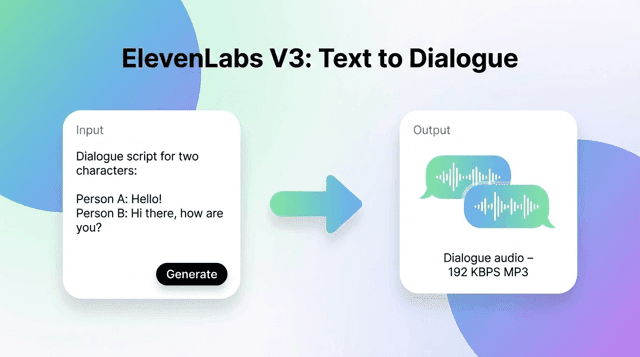
One Click, Complete Dialogue
With ElevenLabs V3, generate your entire conversation at once. The AI understands who's speaking, when to pause, how to react. A 10-minute podcast intro takes 30 seconds instead of 3 hours to edit.
90+ Voices You Won't Believe Are AI
Podcasters, storytellers, game characters, TikTok-style voices. ElevenLabs V3 voices sound like real people having real conversations. Pick different voices for each speaker. Preview before you commit.
Make Characters Actually Emote
Drop [laughs] in your script. The character laughs. Add [whispering] and they whisper. ElevenLabs V3 supports 6 emotion tags: excited, whispering, laughing, sighing, sad, angry. No voice actor direction needed.
75+ Languages, Native Pronunciation
Your Korean audience gets Korean that sounds Korean. Your Spanish listeners get proper Spanish inflection. ElevenLabs V3 handles 75+ languages without the robotic accent that ruins immersion.
Generate ElevenLabs V3 Dialogue in 60 Seconds
No account to start. No credit card. Just paste your script into ElevenLabs V3 and go.
Add Your Speakers
Click + to add dialogue lines. Give each speaker a different ElevenLabs V3 voice. Add as many characters as your story needs.
Write or Paste Your Script
Type what each person says. Want emotion? Add [excitedly] or [whispering] anywhere. The AI handles the rest.
Pick Your Voices
Browse 8 categories. Preview any voice with one click. Match voices to characters. ElevenLabs V3 keeps each voice distinct.
Generate and Download
Hit Generate. Wait 30 seconds. Download your MP3. Drop it into your podcast, video, or game. You're done.
Why Creators Choose ElevenLabs V3
The only AI that generates complete multi-speaker dialogue in one shot
Real Conversation Flow
ElevenLabs V3 understands context. When one character asks a question, the other responds naturally. Pauses land where they should. No awkward timing.
6 Emotion Tags
Add [excitedly] [whispering] [laughs] [sighs] [sadly] [angrily] anywhere in your script. ElevenLabs V3 performs the emotion, not just reads the text.
Unlimited Speakers
Two hosts? Ten game characters? A classroom scene? ElevenLabs V3 handles any number. Every voice stays distinct through the whole conversation.
Stability Control
Want consistent narration? Slide stability up. Want natural conversation variation? Slide it down. ElevenLabs V3 lets you dial in exactly what you need.
8 ElevenLabs V3 Voice Categories
Best for V3, TikTok voices, Studio conversational, Video game characters, Narration, Announcers, Epic, Meditative. Find the right ElevenLabs V3 voice in seconds.
Instant MP3 Download
Your ElevenLabs V3 audio downloads the moment it's ready. High-quality MP3. Drag into any editor. No conversion needed.
What Creators Build with ElevenLabs V3
Real ElevenLabs V3 results from real users
Alex Thompson
“I edited interview segments for 4 hours every episode. Now ElevenLabs V3 generates realistic two-person conversations in 45 seconds. Production time dropped 80%. Listeners ask who our new voice actors are.”
Maria Santos
“12-character audiobook. Would have cost $15,000 in voice talent. ElevenLabs V3 did it for $200. The emotion tags make dialogue scenes actually work. Characters laugh, whisper, get angry. Readers can't tell it's AI.”
David Chen
“40 NPCs needed voice acting. Studios quoted $50K. ElevenLabs V3 gave us professional quality for $200. The video game character category was perfect. We shipped with full voice acting. Players love it.”
Sarah Kim
“I make content in English and Korean. ElevenLabs V3 handles both with native pronunciation. My Korean audience can't believe it's AI. Views on translated videos went up 3x.”
James Wilson
“Replaced monotone narration with conversational dialogue. Course completion rates jumped 35%. Students say it feels like learning from real people. ElevenLabs V3 paid for itself in week one.”
Emma Liu
“We localize ad content into 12 languages. Used to take 3 weeks. ElevenLabs V3 does it in 3 days. Quality is indistinguishable from human voice actors. Campaign launches are 7x faster now.”
ElevenLabs V3 Questions Answered
Everything you need to know before you start
What makes ElevenLabs V3 different from regular text-to-speech?
Regular TTS generates one voice at a time. You have to create each speaker separately and edit them together. ElevenLabs V3 generates the complete conversation in one shot. It understands context between speakers, adds natural pauses, and makes reactions sound real.
How do the emotion tags work in ElevenLabs V3?
Add [excitedly] [whispering] [laughs] [sighs] [sadly] or [angrily] anywhere in your text. ElevenLabs V3 performs that emotion naturally. Write: '[laughs] That's hilarious!' and the voice actually laughs before speaking.
How many voices does ElevenLabs V3 have?
Over 90 voices across 8 categories: Best for V3, Popular TikTok, Studio conversational, Video game characters, Narration, Announcers, Epic, and Meditative. Preview any voice before you use it.
What languages does ElevenLabs V3 support?
75+ languages including English, Mandarin, Japanese, Korean, Spanish, French, German, Portuguese, Italian, Russian, Arabic, Hindi, Thai, Vietnamese, and Indonesian. Each sounds native, not robotic.
How much does ElevenLabs V3 cost?
14 credits per 1,000 characters. A 500-character dialogue costs 7 credits. New users get free credits to try ElevenLabs V3 before purchasing. Most podcast intros cost under 20 credits.
Is there a limit on speakers per dialogue?
No limit. Add as many speakers as your project needs. ElevenLabs V3 keeps every voice distinct whether you have 2 speakers or 20.
Can I preview ElevenLabs V3 voices before generating?
Yes. Click any voice to hear a sample. Find the right voice for each character without spending credits on full generations.
What format does ElevenLabs V3 export?
High-quality MP3. Downloads instantly when generation completes. Works with any podcast editor, video editor, or game engine.